

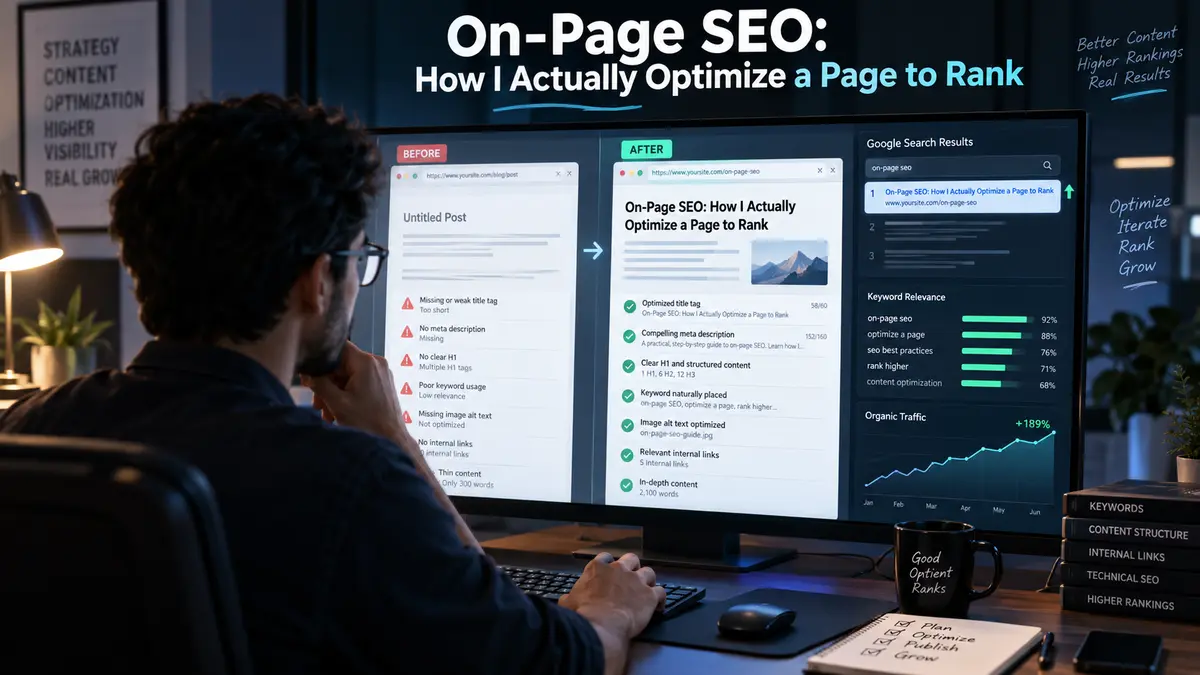
I used to think on-page SEO was mostly about checking boxes.
Add the keyword.
Fix the title.
Write the meta description.
Add internal links.
Optimize the images.
Done.
Then I started seeing something that bothered me.
Pages with almost every SEO box checked still weren't ranking.
That's when I stopped thinking about on page SEO as a checklist.
Now, before I optimize anything, I ask a different question:
What is actually stopping this page from performing?
Sometimes it's search intent.
Sometimes it's the content.
Sometimes it's the way the page is structured.
Sometimes the page is ranking but for the wrong searches.
And sometimes the problem has nothing to do with adding more content.
Here's how I actually work through it.
What On Page SEO Actually Means to Me
On page SEO is the process of improving the content and elements on an individual webpage so search engines can better understand it and visitors can get what they came for.
If you're still building your understanding of SEO as a whole, start with my complete SEO guide, where I break down how on-page, technical, off-page, local, and other areas of SEO fit together.
That includes things you can directly control:
- Content
- Title tags
- Meta descriptions
- URLs
- Headings
- Keywords and related topics
- Images
- Internal links
- Page structure
- Readability
- User experience
But here's where I think many SEO guides make things unnecessarily complicated.
On page SEO isn't just about putting a keyword in the right places.
It's about making the purpose of your page obvious.
If you land on a page and immediately understand what it covers, who it's for, and what you can do next, that's good communication.
Google needs that clarity too.
And I keep one distinction in mind:
On page SEO = what you optimize on the page.
Technical SEO = how effectively search engines can crawl, render, index, and access your site.
Off page SEO = signals and relationships that exist beyond your website, such as links and brand mentions.
Keeping those boundaries clear makes optimization much easier.
Before I Optimize a Page, I Figure Out What It's Supposed to Rank For
This is where I start.
Not with keyword density.
Not with a checklist.
With intent.
I Start With Search Intent, Not Keyword Density
Before you write or rewrite a page, ask yourself:
What does someone searching this query actually want?
If you're targeting "how to do keyword research," for example, a 500-word definition probably isn't enough.
You'd expect a process.
Examples.
Tools.
Steps.
Maybe mistakes to avoid.
If the search results are dominated by tutorials and practical guides, publishing a thin definition page probably isn't going to satisfy the same intent.
So before you touch the copy, understand the search.
I Look at What Google Is Already Ranking
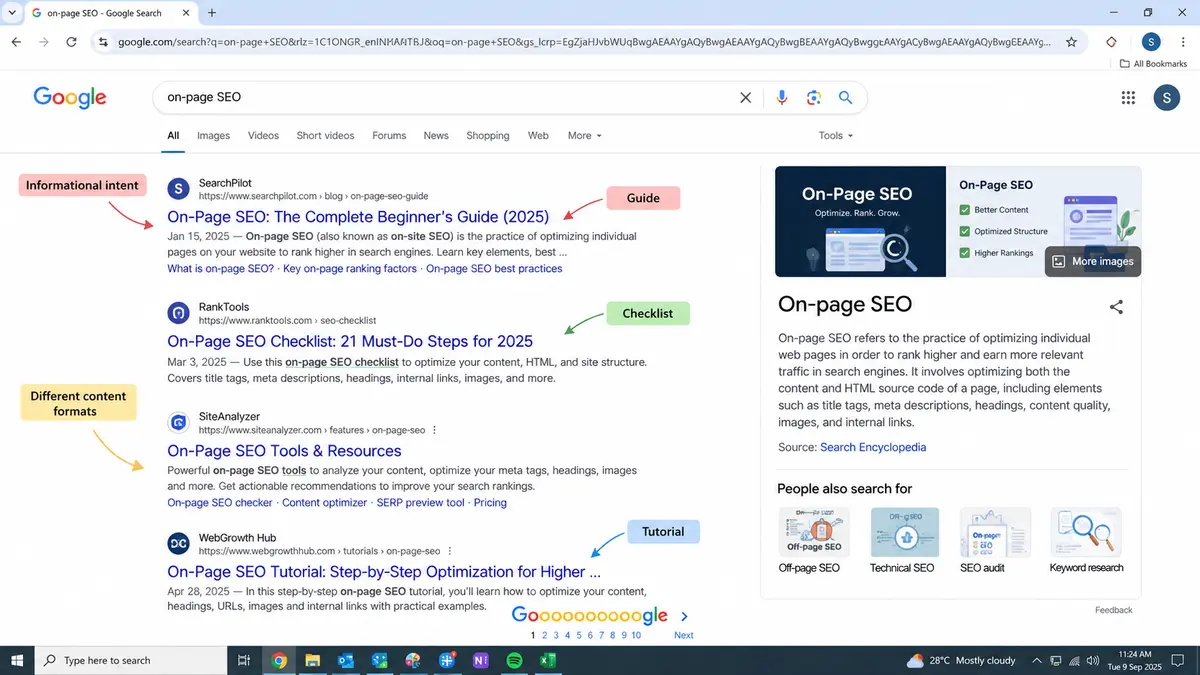
One of the simplest things you can do is search your target query.
Look at the first page.
What type of content appears?
Are the results:
- Guides?
- Product pages?
- Comparison articles?
- Videos?
- Category pages?
- Local businesses?
- Forums?
Then look deeper.
What questions are those pages answering?
What topics keep appearing?
What are they doing well?
And, just as importantly, what aren't they answering well?
You're not trying to copy the top ranking pages.
You're trying to understand the expectations you've entered.
I Choose One Primary Topic
I like a simple rule:
One page = one primary topic.
That doesn't mean your page can only rank for one keyword. It absolutely can rank for hundreds or thousands of related queries.
It means you should know what the page is fundamentally about.
For example, if your page is about on-page SEO, you can naturally cover:
- On page SEO checklist
- On page optimization
- SEO content optimization
- Keyword placement
- Internal linking
- Title optimization
- Search intent
You don't need to force every variation into the copy.
The topic should naturally create the language.
I Map Supporting Topics Around It
Once I know the primary topic, I ask:
What does someone need to understand before they can say, "Yes, this answered my question"?
Those supporting topics become your sections.
That's much more useful than starting with a keyword list and trying to squeeze every phrase into your article.
How I Structure a Page So Google and Readers Understand It
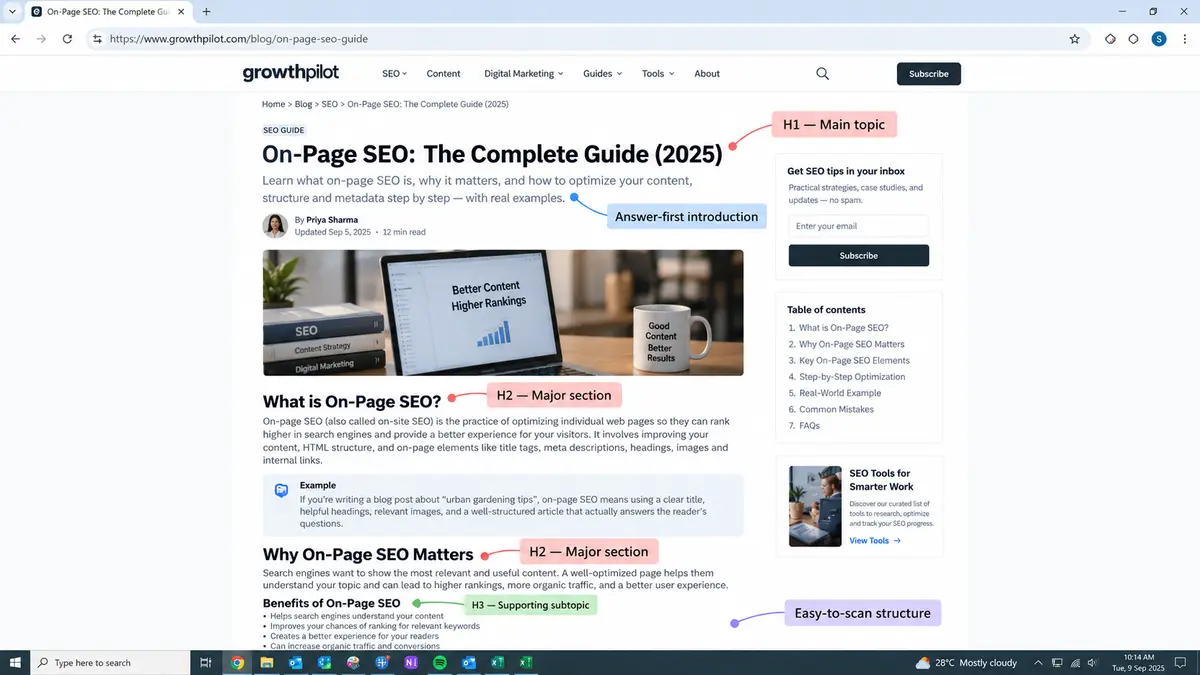
Once I know the intent, I think about structure.
A good page should feel easy to navigate.
You should be able to skim the headings and understand where the article is going.
How I Write the H1
Your H1 should tell you what the page is about without making you think too hard.
I don't try to make it clever.
Clarity wins.
Instead of forcing keywords into an awkward headline, I try to make the promise of the page obvious.
How I Turn Search Questions Into H2s
One of my favorite ways to build a page is to turn the questions behind the search into headings.
If you're writing about internal linking, your sections might naturally become:
- What Is Internal Linking?
- Why Internal Links Matter
- How I Choose Internal Linking Opportunities
- How Many Internal Links Should You Add?
- Common Internal Linking Mistakes
Now the structure follows the reader's journey.
When I Use H3s
I use H3s when a section becomes too large or contains distinct subtopics.
The goal isn't to create a complicated heading hierarchy.
The goal is to make the page easier for you to navigate.
How I Build an Answer First Structure
I've become increasingly conscious of this.
If you ask a question, you shouldn't have to read 700 words of introduction before getting an answer.
Give people the answer.
Then explain it.
Then add context, examples, evidence, and nuance.
That's a much better reading experience.
How I Write Content That Deserves to Rank
This is where on page SEO moves beyond metadata and HTML.
I Don't Write to Hit a Word Count
I've never liked the idea that a page needs to be 2,000 words simply because another page is 2,000 words.
If you can completely answer the question in 1,200 words, why add another 800?
You're not creating value.
You're creating friction.
Ask yourself:
If you finish reading this page, will you still need to return to Google to find the answer?
If the answer is yes, you may have more work to do.
I Look for Questions Competitors Haven't Answered
This is one of the easiest ways to make your content more useful.
Read competing pages.
Read their headings.
Look at their FAQs.
Then ask:
What would I still want to know after reading this?
Those unanswered questions can become opportunities.
Sometimes the biggest content gap isn't a missing keyword.
It's a missing explanation.
I Add Examples Instead of Empty Fluff
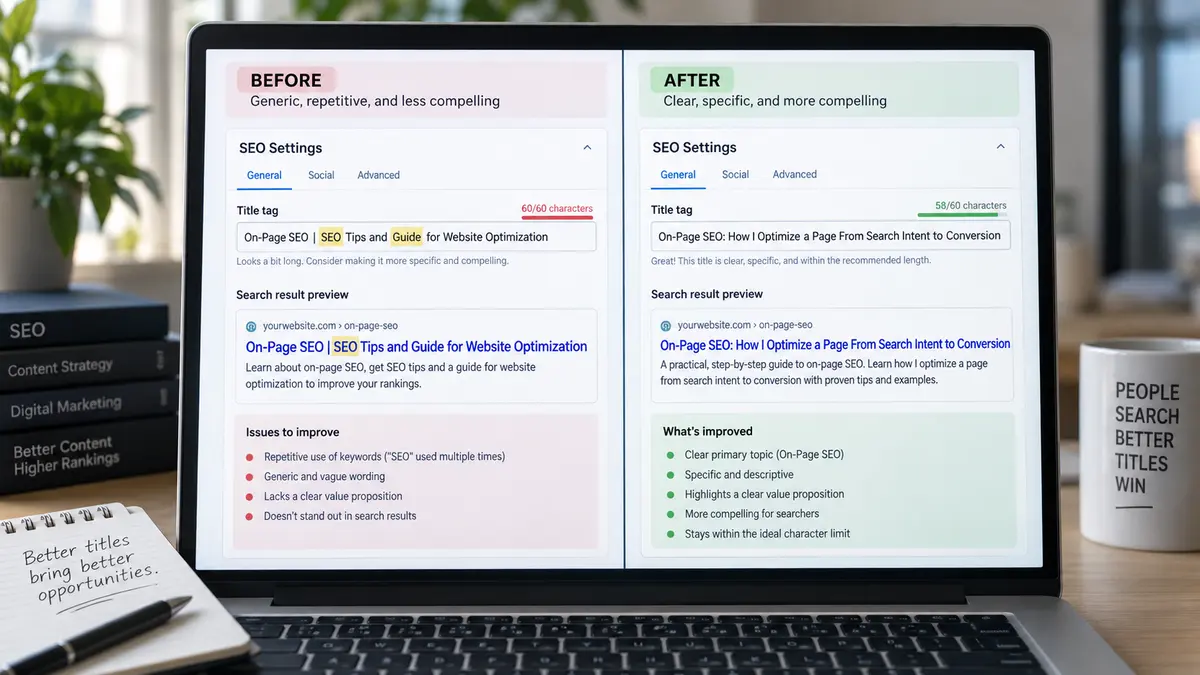
If you can show something, show it.
If you can give an example, give one.
If you're explaining a title tag, don't just tell me that titles should be compelling.
Show me the difference between a weak title and a better one.
Examples turn abstract SEO advice into something you can actually use.
I Bring in First-Hand Experience
This is something I value more as I write.
If I've tested something, struggled with something, changed an approach, or learned something the hard way, I'd rather share that experience than repeat generic advice.
You can find generic SEO advice everywhere.
What makes your content memorable is often the part that came from actually doing the work.
I Know When to Delete Content Instead of Adding More
More isn't always better.
Sometimes a page is too broad.
Sometimes you've repeated the same point three different ways.
Sometimes an old section no longer supports the search intent.
So before adding another 500 words, I ask:
Does this page really need more content or does it need less, but better content?
How I Optimize the Page's Core SEO Elements
Once the content and structure are right, I work through the core elements.
How I Write the Title Tag
Your title has two jobs.
It helps search engines understand the page.
And it gives you a chance to earn the click.
So I try to make the topic clear while giving you a reason to care.
Don't write a title just because the keyword fits.
Write it for the person who is scanning the search results and deciding what to click.
How I Write the Meta Description
Your meta description isn't something I obsess over as a direct ranking lever.
I think about it more as search-result copy.
You have limited space to tell someone:
Here's what you'll get if you click.
Make that reason clear.
How I Keep URLs Clean
I prefer short, descriptive URLs.
For example:
example.com/on-page-seo
is much easier to understand than:
example.com/article?id=83920
You don't need to make URLs complicated.
Keep them readable and focused.
How I Use Keywords Naturally
Keyword stuffing isn't a strategy.
If you have to read your sentence twice because you're wondering why a keyword was inserted there, it probably shouldn't be there.
Use your primary topic where it makes sense:
- Title
- H1
- Introduction
- Relevant headings
- URL
- Body content
Then write naturally.
Related terminology will appear because you're genuinely covering the topic.
How I Optimize Images
Images can make a page easier to understand, but they shouldn't become an afterthought.
When you add an image, think about what it contributes.
Could it explain something?
Show a process?
Make a complex idea easier to understand?
Then optimize it.
I pay attention to:
- Descriptive filenames
- Useful alt text
- Appropriate image dimensions
- Compression
- Modern image formats where appropriate
Your alt text should describe the image when that description is useful not become a dumping ground for keywords.
How I Build Internal Links That Strengthen the Whole Site
Internal linking is one of the areas where I try to think beyond the individual page.
You're not just adding links.
You're building relationships between your content.
Imagine you're reading this article and want to learn more about search intent.
A relevant internal link takes you there.
That's useful for you.
It's also useful for search engines trying to understand how your content fits together.
How I Choose Which Pages to Link
I ask:
What would you naturally want to read next?
That question often produces better internal links than blindly following a numerical rule.
How I Use Anchor Text
I want anchor text to give you a reasonable idea of what you'll find after clicking.
It doesn't need to sound robotic.
It just needs to be descriptive and natural.
How I Connect Pillar and Supporting Content
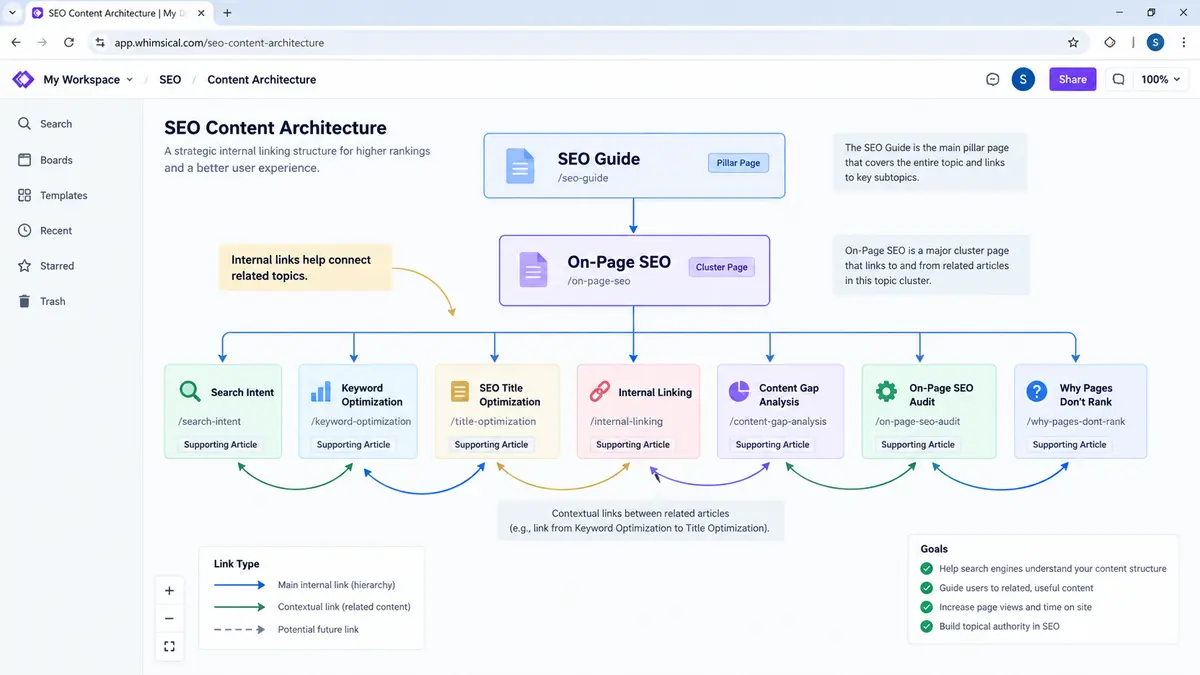
This becomes especially important when you're building a topical cluster.
Your broader SEO Guide can connect to your On Page SEO page.
Then On-Page SEO can connect to supporting articles about:
- Search intent
- Keyword optimization
- Internal linking
- Content gaps
- SEO titles
- On-page SEO audits
Now your website starts behaving like a connected knowledge system instead of a collection of unrelated articles.
How I Diagnose a Page That Isn't Ranking
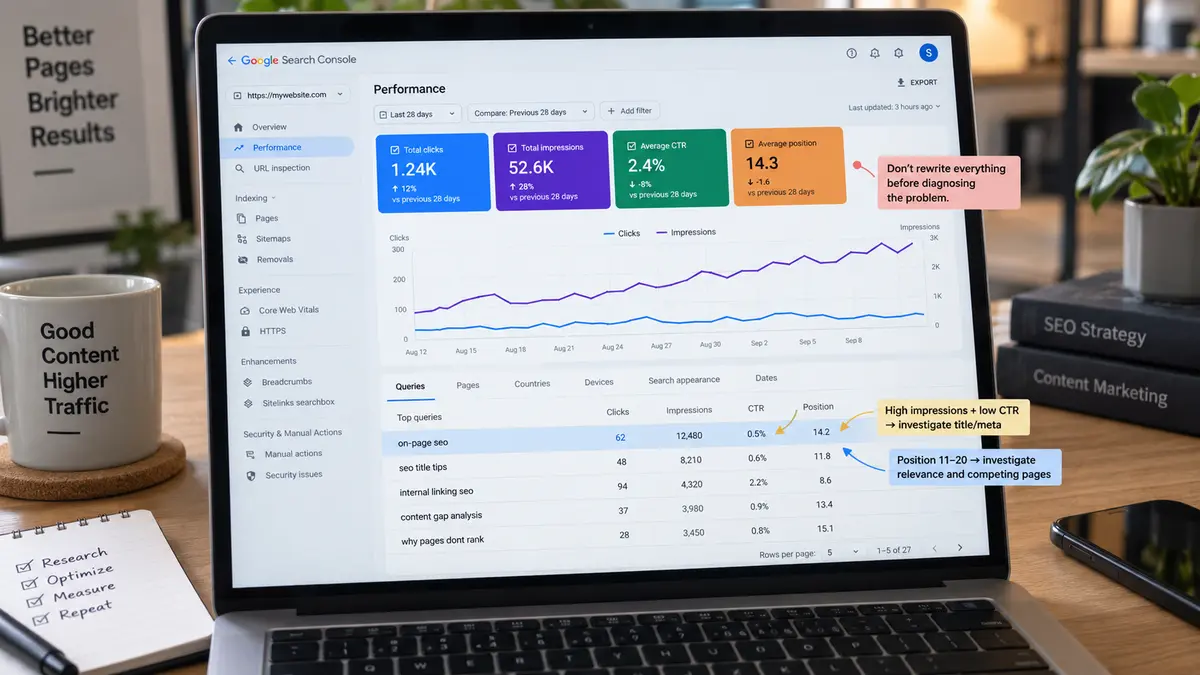
This is the part I wish more on-page SEO guides covered.
Because knowing what to optimize is useful.
Knowing what to fix first is much more useful.
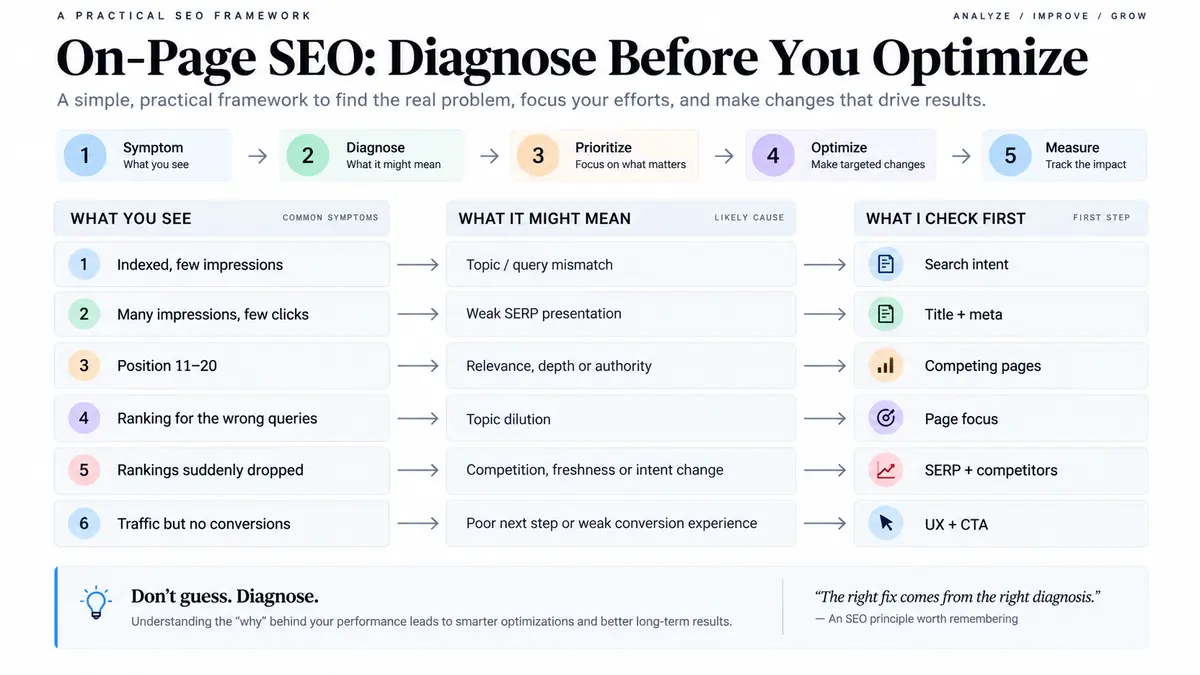
Your Page Is Indexed but Barely Gets Impressions
First, I'd question whether the page is aligned with the searches you're targeting.
Is the topic clear?
Is the intent correct?
Is the page actually providing something useful for that query?
Don't immediately start adding keywords.
Diagnose the problem first.
Your Page Gets Impressions but Few Clicks
Now I'd look at the search-result presentation.
Your title might not be compelling.
Your description might not communicate the benefit.
Or the search intent might tell you that your result simply isn't what searchers are looking for.
Your Page Is Stuck on Page Two
This is where I look closely at relevance, depth, content quality, internal links, and competitive strength.
Being position 12 isn't necessarily a sign that you need 2,000 more words.
You might need a better answer.
Your Page Ranks for the Wrong Keywords
This usually tells me something important about how Google interprets the page.
Maybe the topic is too broad.
Maybe the content is diluted.
Maybe your headings point in a different direction from your intended query.
Instead of forcing the desired keyword harder, I'd revisit the page's actual focus.
Your Rankings Suddenly Dropped
Don't immediately rewrite everything.
First, find out what changed.
Did competitors improve?
Did the search intent shift?
Has your content become outdated?
Did your internal linking change?
Did the SERP itself change?
A ranking drop is a diagnosis problem before it's an editing problem.
Your Page Ranks but Doesn't Convert
Ranking isn't the finish line.
If you get traffic but nobody takes the next step, look at the experience after the click.
Does the page build trust?
Does it answer the right question?
Is the CTA relevant?
Is the next step obvious?
Your page has to satisfy both the search and the person behind it.
What I Check Before Adding More Content
Before expanding a page, I run through a smaller set of questions:
Search intent: Are you giving the answer searchers actually want?
Competitor coverage: What are the strongest competing pages doing?
Content gaps: What useful questions are still unanswered?
Internal links: Are relevant pages connected?
Information gain: Are you adding something beyond what everyone else already says?
First-hand experience: Can you add examples, observations, tests, or lessons that make the page more useful?
That last part matters.
If your page simply rearranges information that's already everywhere, adding another thousand words may not solve the problem.
How I'm Approaching On Page SEO for AI Search
Search is changing.
People aren't always getting their first answer from a traditional list of blue links anymore.
That makes me think about content differently.
How I Make Important Answers Easy to Understand
If you have an important answer buried inside a giant paragraph, it's harder for everyone to understand.
I prefer clear explanations.
Useful headings.
Direct answers.
Examples.
Logical structure.
Why Original Information Matters
If you can add something based on actual experience, research, original data, testing, or observation, do it.
You don't want your page to be another version of the same ten articles everyone else has already published.
How I Structure Content for AI Search
I don't try to write for a mysterious "AI ranking factor."
Instead, I focus on making information easy to interpret.
Clear questions.
Clear answers.
Useful context.
Logical relationships between concepts.
Specific examples.
That's good content for humans too.
What I Don't Believe About "AI SEO"
I'm skeptical whenever someone promises a magic formatting trick that will suddenly make your content appear everywhere in AI search.
Search systems change.
Formats change.
What remains useful is information that is clear, trustworthy, relevant, and genuinely helpful.
So that's where I'd put my effort.
The On-Page SEO Checklist I Actually Use
Before I publish or update a page, I don't treat every item as equally important.
I ask:
- Does the page satisfy the right search intent?
- Is there one clear primary topic?
- Does the content genuinely answer the question?
- Is the title worth clicking?
- Does the H1 make the topic obvious?
- Do the headings follow a logical structure?
- Have I covered the important subtopics?
- Have I added useful examples or first-hand insights?
- Are the keywords used naturally?
- Are the images useful and optimized?
- Are relevant internal links included?
- Is the page easy to scan?
- Does the page give you a clear next step?
- Is there anything unnecessary that I should remove?
That's my real checklist.
Not 50 boxes.
Just the things that can meaningfully improve the page.
What I Stopped Doing in On-Page SEO
Over time, I've stopped doing a few things simply because an SEO checklist told me to.
I Stopped Chasing Keyword Density
I care about topic coverage and relevance far more than hitting an arbitrary percentage.
I Stopped Writing for Arbitrary Word Counts
If you need 800 words, write 800.
If you need 2,500, write 2,500.
The question is whether you answered the question—not whether you hit a number.
I Stopped Adding Keywords Where They Don't Belong
If a phrase makes the sentence awkward, I'll rewrite the sentence—or leave the phrase out.
I Stopped Treating Every SEO Checklist Item as Equally Important
This is probably the biggest change.
A missing comma in an image filename shouldn't get the same attention as a page targeting the wrong search intent.
Prioritize the problem that can actually change the outcome.
I Stopped Assuming More Content Automatically Means Better Content
Sometimes you don't need another section.
You need a better explanation.
Sometimes you don't need another keyword.
You need a clearer answer.
Sometimes you don't need more content at all.
You need to remove the parts that aren't helping.
What On Page SEO Has Taught Me
The longer I work with SEO, the less I see on page optimization as a technical checklist.
On page SEO is only one part of the bigger picture. If you want to understand how it fits alongside technical SEO, off page SEO, keyword research, and the rest of the process, you can continue with my SEO guide.
I see it as communication.
You are trying to communicate with two audiences at the same time.
A search engine needs to understand:
What is this page about?
And you need to understand:
Is this page actually going to help me?
When those two things line up, on page SEO becomes much simpler.
You choose the right topic.
You understand the intent.
You structure the page clearly.
You answer the important questions.
You add useful context and experience.
You connect the page to the rest of your website.
Then you measure what happens and improve it.
That's the approach I trust more than blindly checking boxes.
Because on page SEO isn't really about making a page look optimized.
It's about making the page genuinely useful, easy to understand, and worthy of the search it wants to win.

I’m an SEO Specialist, Content Writer, and Digital Marketing Professional with expertise in technical SEO, keyword research, content strategy, and WordPress. I create high-quality, SEO-optimized content that helps businesses improve organic visibility, attract the right audience, and grow through search and AI-powered discovery.